What Is a 3D Filament? Types, Materials & Compatibility
If you’ve spent any time with a desktop 3D printer, you’ve probably handled spools of filament without thinking much about what they actually are. These rolls of plastic feed into your machine and somehow become gears, brackets, or cosplay helmets—but the material itself rarely gets a second glance. This guide cuts through the jargon and gives you the facts you need, backed by manufacturer data and expert sources.
Primary Material: Thermoplastics like PLA · Common Form: Continuous slender plastic thread · Key Use: Fused filament fabrication 3D printers · Top Types: PLA, ABS, PETG · Standard Diameter: 1.75mm or 2.85mm
Quick snapshot
- Exact compatibility varies by printer model—no universal answer
- Cost per print differs significantly by setup and brand
- Carbon fiber and composite filaments gaining traction (Flashforge)
- Specialty grades continue expanding material options (Flashforge)
| Property | Value |
|---|---|
| Material Base | Thermoplastics (PLA, ABS, PETG) |
| Form Factor | 1.75mm or 2.85mm diameter spools |
| Melting Process | Heated to shape, cools to solidify |
| Primary Use | Fused filament fabrication (FFF) |
| Top Six Polymers | PLA, ABS, PETG, TPU, Nylon, PC |
| Heat Resistance (PLA) | ~60°C |
What Is a 3D Filament?
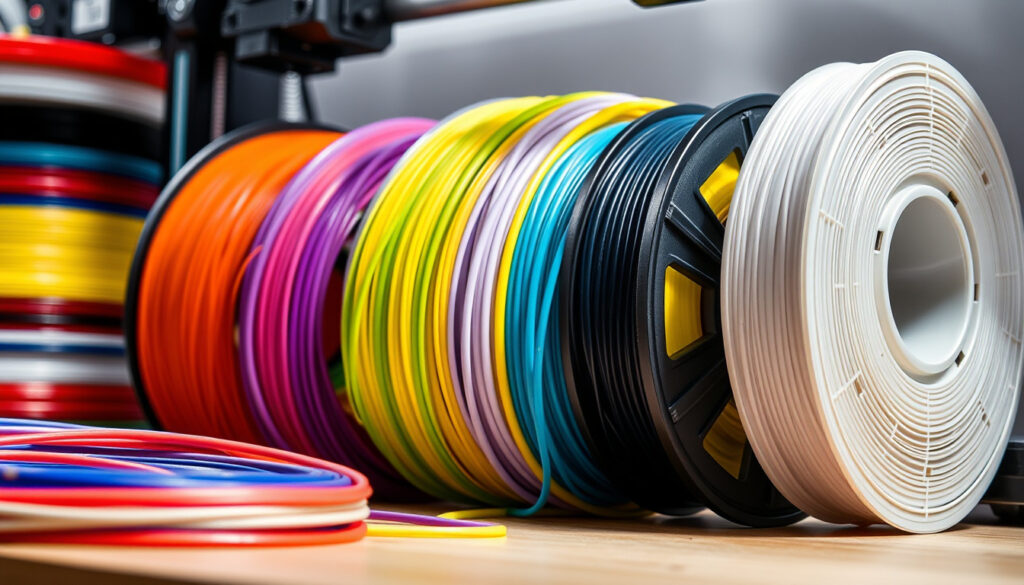
A 3D filament is the thermoplastic feedstock used in fused filament fabrication (FFF) 3D printers—the most common type of desktop 3D printing technology. According to UltiMaker’s manufacturing guide, it comes as one continuous slender plastic thread wound onto a spool, fed through a heated nozzle, and extruded layer by layer to build objects.
The two standard diameters you’ll encounter are 1.75mm and 2.85mm. The smaller 1.75mm size has become the most common because it offers more precise control over extrusion and works with a wider range of printers, according to UltiMaker.
Definition from top sources
- Thermoplastic feedstock for fused filament fabrication (FFF) printers
- Comes as continuous slender plastic thread spooled into reels
- Melts when heated, solidifies when cooled to form objects
Basic properties
| Diameter | Common Use |
|---|---|
| 1.75mm | Most desktop printers, precise control |
| 2.85mm | Industrial printers, larger extrusion volume |
Filament is essentially specialized plastic wire. The diameter and material type determine which printer you can use and what properties your finished prints will have.
What Is 3D Printer Filament Made Of?
3D printer filament is made from thermoplastics—polymers that melt when heated rather than burn. According to Xometry’s material guide, these range from plant-based PLA to engineering-grade Nylon, each with distinct properties suited for different applications.
Common thermoplastics
- PLA (Polylactic Acid): Derived from plant sources like cornstarch, biodegradable, printing at 180-230°C
- ABS (Acrylonitrile Butadiene Styrene): Petroleum-based, durable, printing at 220-250°C
- PETG: Combines ease of PLA with strength of ABS, printing at 220-250°C
- TPU/TPE: Flexible elastomers, printing at 220-250°C
- Nylon: Engineering-grade, printing at 240-260°C
PLA and alternatives
PLA dominates beginner-friendly 3D printing because it prints at lower temperatures (180-230°C) with minimal warping and doesn’t require a heated bed. According to UltiMaker, PLA offers an excellent starting point for beginners due to these forgiving properties.
ABS provides higher impact strength and heat resistance but warps more easily and requires ventilation due to fumes, per Xometry.
The implication: PLA works for most casual users, but functional parts exposed to heat or stress often need ABS, PETG, or Nylon.
What Filament Do I Need for a 3D Printer?
Choosing filament depends primarily on your printer’s specifications—specifically the maximum nozzle temperature and whether it has a heated bed. Additive Plus notes that not every printer handles every filament, so checking your machine’s specs is essential before purchasing material.
Matching printer specs
- Check maximum hotend temperature (some are limited to 240°C despite 280°C capability)
- Verify heated bed availability and maximum bed temperature
- Confirm extruder type: direct drive vs. bowden (affects flexible filaments)
Popular types overview
| Filament | Nozzle Temp | Bed Temp | Best For |
|---|---|---|---|
| PLA | 180-230°C | None or 40-60°C | Beginners, prototypes |
| ABS | 220-250°C | 95-110°C | Functional parts |
| PETG | 220-250°C | 70-80°C | Outdoor, water-resistant |
| TPU | 220-250°C | 40-60°C | Flexible parts |
| Nylon | 240-260°C | 70-100°C | Mechanical components |
The Creality Ender-3, a popular budget printer, reaches 280°C at the hotend but is limited to 240°C due to PTFE tubing. Its heated bed reaches 110°C, supporting PLA, ABS, TPU, and PETG with the standard 0.4mm brass nozzle, according to Creality’s official specifications.
What Filament Works with FlashForge?
FlashForge manufactures several FDM printer lines, and filament compatibility varies by model. According to FlashForge’s material guide, their printers generally support PLA, ABS, PETG, and flexible filaments, but specific temperature settings and hardware requirements differ.
FlashForge specific recommendations
- PLA: Most compatible, lowest temperature requirements
- ABS: Requires heated bed and ventilation
- PETG: Good balance of ease and durability
- TPU: Works but may require slower print speeds
Siraya Tech options
Siraya Tech produces specialty filaments popular with FlashForge users. Their technical resins and flexible materials offer alternatives for users seeking specific properties beyond standard PLA and ABS.
The trade-off: FlashForge printers handle most common filaments well, but specialty materials like carbon fiber or high-temperature Nylon may require nozzle upgrades and modified settings.
Can 3D Printers Use Any Filament?
No—3D printers cannot use any filament universally. Each printer has hardware and temperature limitations that restrict which materials it can safely process. According to UltiMaker, the six most used polymers in desktop 3D printing are PLA, ABS, PETG, TPU, Nylon, and PC, but not all work with all printers.
Printer limitations
- Temperature limits: PTFE-lined hotends typically max out around 240-250°C
- Nozzle material: Brass nozzles wear quickly with abrasive filaments like carbon fiber; hardened steel nozzles cost more
- Extruder type: Bowden extruders struggle with flexible filaments like TPU
Do all use the same?
Different printers have vastly different capabilities. Bambu Lab’s filament guide provides detailed specifications including toughness data: their PLA measures 26.6 kJ/m² XY impact strength, while TPU 95A HF requires a 0.4-0.8mm hardened steel nozzle due to its abrasive nature.
What this means: Budget printers like the Ender-3 handle standard filaments well, while premium machines offer broader material compatibility and better specs for engineering-grade polymers.
Filament Properties and Specifications
Eight key materials account for the vast majority of all desktop 3D prints, each with distinct characteristics.
| Material | Print Temp | Bed Temp | Key Properties |
|---|---|---|---|
| PLA | 180-230°C | 40-60°C | Biodegradable, low warp, no heated bed needed |
| ABS | 220-250°C | 95-110°C | High impact strength, heat resistant, warps easily |
| PETG | 220-250°C | 70-80°C | Impact resistant, flexible, chemical stable |
| TPU | 220-250°C | 40-60°C | Elastic, abrasion resistant, slow print speeds |
| Nylon | 240-260°C | 70-100°C | Engineering-grade, hygroscopic, high durability |
| PC (Polycarbonate) | 270-310°C | 90-115°C | Extremely strong, high heat resistance |
| Carbon Fiber | Varies | Varies | Stiff, lightweight, requires hardened nozzle |
| ASA | 240-260°C | 90-110°C | UV resistant, similar to ABS |
Carbon fiber filaments are stiffer and lighter than standard plastics, but brass nozzles wear down quickly when printing them. Creality notes that brass nozzles wear quickly with abrasive materials—budget that upgrade if you’re serious about composites.
The implication: Material choice dictates both printer requirements and achievable print characteristics—cheaper setups constrain you to standard polymers, while engineering-grade filaments demand higher-spec hardware.
PLA is an excellent starting point for beginners. Its low printing temperature (180-230°C) and minimal warping make it easy to work with.
— UltiMaker Guide (FFF Manufacturer)
Bambu Lab’s PLA measures 26.6 kJ/m² XY impact strength, showing that impact resistance varies significantly between brands.
— Bambu Lab Filament Guide (Printer Manufacturer)
PETG combines many of the best qualities of PLA and ABS.
— UltiMaker Guide (FFF Manufacturer)
Related reading: 3D printer filament diameters in inches · Filament spool weight conversions
Printers like the Anycubic Kobra 3 Combo simplify multi-color projects by automatically switching filaments without manual intervention.
Frequently asked questions
What are the most common 3D filament types?
The six most widely used polymers are PLA, ABS, PETG, TPU, Nylon, and PC, according to All3DP. PLA dominates due to its ease of use, while PETG has gained significant popularity as a middle ground between PLA and ABS.
How do I choose filament for my printer?
Match your printer’s maximum nozzle and bed temperatures to the filament’s requirements. Check whether you have a direct-drive or bowden extruder—flexible filaments like TPU work best with direct-drive systems. Also consider whether you need a hardened steel nozzle for abrasive materials.
What is PLA filament?
PLA (polylactic acid) is a biodegradable thermoplastic derived from plant sources like cornstarch. It prints at 180-230°C with minimal warping and doesn’t require a heated bed, making it the most beginner-friendly option, per UltiMaker. However, it has low heat resistance (~60°C) and degrades under UV exposure.
Is ABS filament safe to print?
ABS is safe to print with proper ventilation. According to Xometry, ABS emits fumes during printing that require adequate airflow. Printers with enclosed build chambers and proper filtration systems handle ABS more safely than open-frame machines.
What diameter filament do most printers use?
Most desktop 3D printers use 1.75mm filament, which has become the industry standard due to its compatibility with a wide range of machines and better extrusion control, per UltiMaker. Industrial printers more commonly use 2.85mm.
Can flexible filament be used in any printer?
No—flexible filaments like TPU and TPE require specific extruder setups. According to Simplify3D, TPU/TPE are known for elasticity but require slow print speeds and perform best with direct-drive extruders rather than bowden setups.
How to store 3D printer filament?
Keep filament sealed in dry bags with desiccant when not in use. Nylon is particularly hygroscopic and should be dried before printing if it has absorbed moisture. PLA is more forgiving but benefits from dry storage to prevent stringing and poor layer adhesion.
More related posts
 RACV Car Insurance: Online Quotes, Claims & Renewals
 Kim Sun Young Strathfield – Husband Charged in Stabbing Death
 Sir Michael Hill: Biography and Legacy of Jeweller and Philanthropist
 Jasmine Stefanovic: Age, Children, Net Worth, and Career
 Josh Radnor: Biography, Wife, Net Worth, and Life After HIMYM
 Fair Play Vouchers – Claim $200 for QLD Kids Sports
 Vittoria Ceretti: Biography, Career, and Relationship
 1 AUD to VND – Current Rate and Best Providers
